“Beyond the Book” Digital Humanities Conference
Digital Humanities,
Events,
2/3/08
Yesterday I was at UC Davis for the “Beyond the Book” Conference on the digital humanities—which was something of an eye-opener for me as far as providing some broader context for the work we do at Vectors. My perspective on this field tends to be very narrowly project-focused, so it was good to have my horizons expanded a bit with both a sense of the history of digital humanities scholarship as well as the obstacles facing those trying to do this kind of work today—work which still lacks the kind of legitimacy within the academy that would make it a less risky choice for junior scholars.
There seemed to be a genuine interest and energy in the room directed towards making it possible for more institutions, scholars, designers and programmers to participate in this kind of work. A number of Vectors projects were featured throughout the day, along with intriguing excerpts from And Then It Was Now by Frances Dyson and a preview of Precision Targets, the project I’m currently working on with Caren Kaplan. Sharon Daniel joined the proceedings virtually from Berlin, where Public Secrets is currently being shown at the Transmediale festival, and I got the chance to speak a bit about the connections between music composition and interactive design, while showing an early version of a visualizer for Vectors project databases (more on that in a future post).
Thanks to Caren Kaplan, Carolyn de la Pena, Jennifer Langdon, the technical staff and everyone else involved at UC Davis for putting on such an informative event and for featuring Vectors so generously.
The slabtype algorithm, Part 4: Final layout and source code
Algorithms,
Flash,
Graphic Design,
Interactive Design,
Source Code,
Typography,
1/30/08
This is the final installment of a four-part graphical dissection of the “slabtype” text layout algorithm I developed for Public Secrets. For an introduction to the algorithm, visit The slabtype algorithm, Part 1: Background. To review some calculations that set the stage, visit Part 2: Initial calculations. To get into the real meat of the algorithm, visit Part 3: Iterative line splitting.
In this post, we’ll wrap things up by doing our final layout of the text, followed by the source code for the algorithm. The iterative sequence we explored in the previous installment successfully turned our original text:
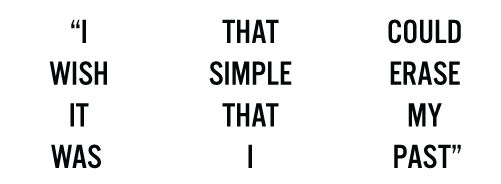
into seven separate lines:
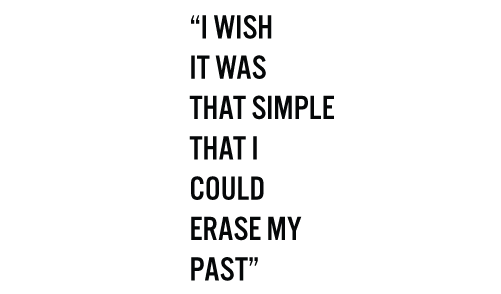
We’re almost done. Our next task is to assemble these lines into a slab by scaling them all to an identical pixel width:
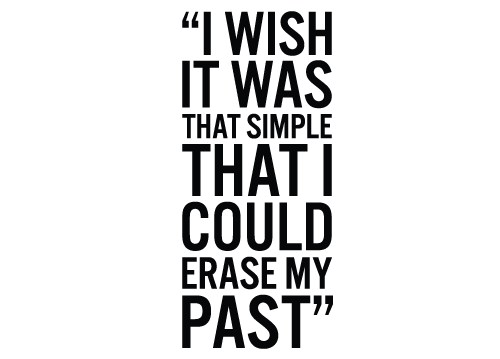
And finally, to scale the entire slab to fit inside the original box, allowing for a minimum amount of padding on each side:
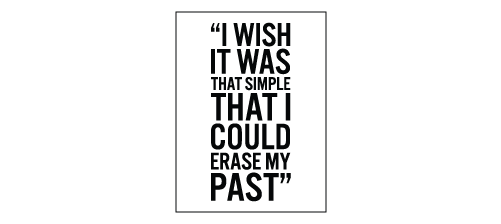
And with that, the algorithm has run its course. In conjunction with the treemap algorithm, the slabtype algorithm allows us to dynamically lay out the entire contents of a screen like this

using only a collection of quotes as a starting point. Due to randomization in the input to the treemap algorithm, even identical collections of quotes are never laid out in exactly the same way. Within Public Secrets, you can briefly see the dynamism of the slabtype algorithm in action when a box containing a quote resizes as it moves from one location to another—the text inside shifts around to keep pace with the changing dimensions of its enclosing rectangle.
This algorithm was included in Public Secrets as a method called formatInscription, which is reproduced below (AS 2.0). I hope this has been a useful exercise—I’d love to get your feedback, questions, or suggestions for improvement.
The slabtype algorithm, Part 3: Iterative line splitting
Algorithms,
Flash,
Graphic Design,
Interactive Design,
Typography,
1/28/08
This is the third in a four-part graphical dissection of the “slabtype” text layout algorithm I developed for Public Secrets. For an introduction to the algorithm, visit The slabtype algorithm, Part 1: Background. To review the calculations that set the stage for this post, visit Part 2: Initial calculations.
In this post, we’ll take up the real workhorse of the slabtype algorithm—iterative line splitting—followed by the final layout of the text.
Our initial calculations provided us with a single very important number: 8, our ideal character count per line. This number gives us a target to aim for as we split our text into individual lines. We start by dividing our text into its constituent words:
Next, we execute the following iterative sequence:
- Create two containers for words. One will hold the next word of the text, the other will hold the next two words of the text.
- Keep adding subsequent words to both containers until the character length of one container is less than or equal to the length of the ideal character count per line, while the character length of the other container is greater than the ideal character count per line.
- Store the contents of the container whose character count is closest to the ideal character count per line.
- Repeat.
Here’s a diagram of how we arrive at our first line using this sequence:
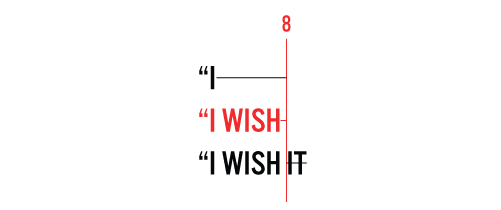
In this example, our two word containers initially hold the words “I and “I WISH. Neither of these exceed the ideal character count per line, so we continue adding words, giving us “I WISH and “I WISH IT. The latter is ten characters long, two characters longer than our ideal character count per line of eight. Since the former is seven characters long, resulting in only a one-character difference between its length and the ideal, we store “I WISH as the contents as the first line of the slab.
Here’s how we arrive at the next line:

Here, we have a very similar case. Neither IT nor IT WAS exceed the ideal character count, so we proceed to IT WAS and IT WAS THAT. IT WAS is only two characters off the ideal, compared to three characters for IT WAS THAT, so we pick the former.

The third line plays out a bit differently. With THAT and THAT SIMPLE, we find that THAT SIMPLE’s character count of eleven is nearer the target of eight than THAT’s character count of four, so we go with the latter.
The fourth line plays out much like the first two:

While the fifth pass chooses the first of the two text containers:

The sixth finds ERASE MY matching the ideal character count per line exactly:

Leaving PAST” as our only remaining word, which becomes a line unto itself.

Since we have exhausted our available words, the iterative part of the algorithm ends, resulting in our original text being split into seven lines:
For the final installment, we’ll turn our attention to laying out the text within the target box (source code will be provided).
Coming soon: The slabtype algorithm, Part 4: Final layout and source code
Previous Page 14 of 25 pages Next
Recent Posts
Go InSight: Composing a Musical Summation of Every Mission to Mars (Part 2)
Documentary music is something that’s interested me ever since hearing Steve Reich’s Different …
Go InSight: Composing a musical summation of every mission to Mars (Part 1)
 Two of my biggest interests—music and space—collided happily with the opportunity to join the …
Cited Works from “Storytelling in the Age of Divided Screens”
Here’s a list of links to works cited in my recent talk “Storytelling in the Age of …
Timeframing: The Art of Comics on Screens
I’m very happy to announce the launch of “Timeframing: The Art of Comics on Screens,” a new website …
The prototype that led to Upgrade Soul
To celebrate the launch of Upgrade Soul, here’s a screen shot of an eleven year old prototype …
Categories
3d content
Algorithms
Animation
Announcements
Authoring tools
Award winners
Comics
Comics related
Commissioned works
Database driven
Digital humanities
Electronic literature
Essays
Events
Exemplary work
Experiments
Featured
Fiction
Flash
Flex
Fun
Games
Games related
Graphic design
Highlights
Interactive design
Ipad
Iphone
Jquery
La flash
Miscellaneous
Museum collected
Music
Musicals
Non fiction
Non project
Opertoon
Original content
Original music
Poetry
Remembrances
Scalar
Shockwave
Source code
Stepworks
Tactile
Tools
Typography
User experience
Vectors journal
Viewfinder
Virtual landscape
Wii